It is very important to note that Flows have almost nothing to do, complexity-wise, with Workflows, Process Builder, or Approval Processes. Where the old tools did a lot of (over)-simplifying for you, Flow exposes a lot of things that you quite simply never had to think about before, such as execution context, DML optimization, batching, variables, variable passing, etc. So if you are an old-timer upgrading your skills, note that **a basic understanding of programming (batch scripting is more than enough) helps a lot with Flow**. If you're a newcomer to Salesforce and you're looking to learn Flow, same comment - this is harder than most of the platform (apart from Permissions) to learn and manipulate. This is normal.
##### **Intended Audience** These conventions are written for all types of Salesforce professionals to read, but the target audience is the administrator of an organization. If you are an ISV, you will have considerations regarding packaging that we do not, and if you are a consultant, you should ideally use whatever the client wants (or the most stringent convention available to you, to guarantee quality). ##### **On Conventions** As long as we're doing notes: conventions are opinionated, and these are no different. Much like you have different APEX trigger frameworks, you'll find different conventions for Flow. These specific conventions are made to be maintainable at scale, with an ease of modification and upgrade. This means that they by nature include boilerplate that you might find redundant, and specify very strongly elements (to optimize cases where you have hundreds of Flows in an organization). **This does not mean you need to follow everything.** A reader should try to understand *why* the conventions are a specific way, and then decide whether or not this applies to their org.At the end of the day, as long as you use **any** convention in your organization, we're good. This one, another one, a partial one, doesn't matter. Just structure your flows and elements.
##### **On our Notation** Finally, regarding the naming of sub-elements in the Flows: we've had conversations in the past about the pseudo-[hungarian notation](https://en.wikipedia.org/wiki/Hungarian_notation) that we recommend using. To clarify: we don't want to use Hungarian notation. We do so because Flow still doesn't split naming schemes between variables, screen elements, or data manipulation elements. This basically forces you to use Hungarian notation so you can have a `var_boolUserAccept` and a `S01_choiceUserAccept` (a variable holding the result of whether a user accepts some conditions, and the presentation in radio buttons of said acceptance), because you can't have two elements just named `UserAccept` even if technically they're different. ##### **On custom code, plugins, and unofficialSF** On another note: Flow allows you to use custom code to extend its functionality. We define "custom code" by any LWC, APEX Class, and associated that are written by a human and plug into flow. We recommend using as little of these elements as possible, and as many as needed. **This includes UnofficialSF**.Whether you code stuff yourself, or someone else does it for you, Custom Code always requires audit and maintenance. Deploying UnofficialSF code to your org basically means that you own the maintenance and audit of it, much like if you had developed it yourself. We emit the same reservations as using any piece of code on GitHub - if you don't know what it does **exactly**, you shouldn't be using it. This is because any third-party code is **not part of your MSA with Salesforce, and if it breaks, is a vector of attack, or otherwise negatively impacts your business, you have no official support or recourse.** This is not to say that these things are not great, or value-adding - but you are (probably) an admin of a company CRM, which means your first consideration should be **user data and compliance**, and ease of use coming second.
*Bonus useless knowledge: Flows themselves are just an old technology that Salesforce released in 2010: Visual Process Manager. That itself is actually just a scripting language: “The technology powering the Visual Process Manager is based on technology acquired from Informavores, a call scripting startup Salesforce bought last year.” (2009) Source* # What Automation do I create Flowchart [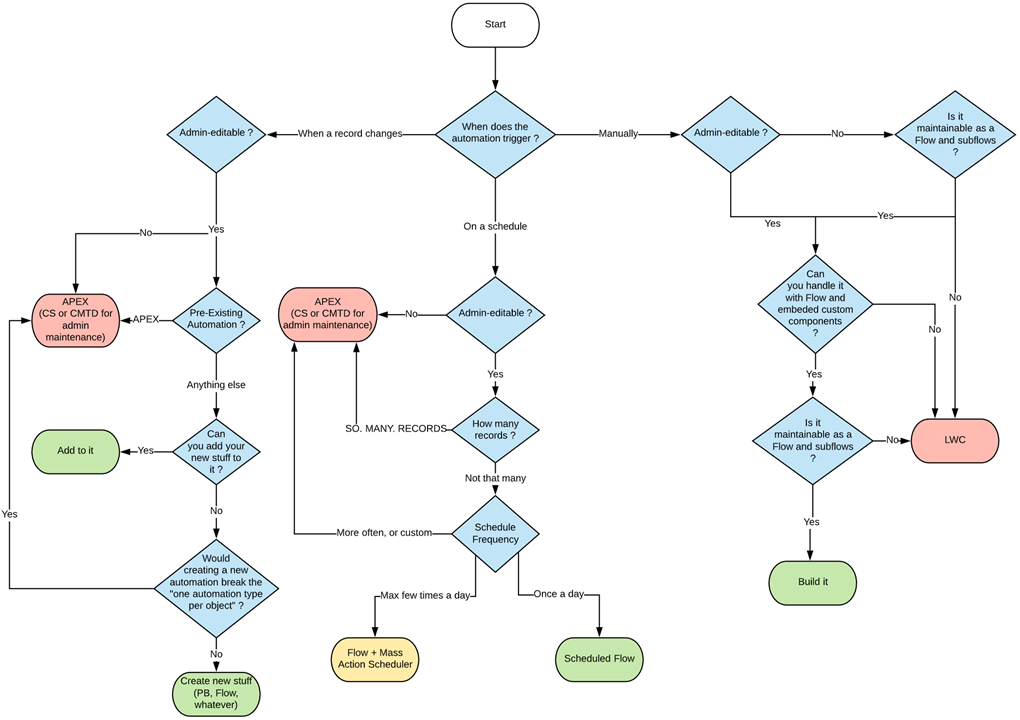](https://wiki.sfxd.org/uploads/images/gallery/2021-01/image-1610555495687.png) # Flow Meta Conventions ## Read these Resources first 1. The official [Flows best practice doc](https://help.salesforce.com/articleView?id=flow_prep_bestpractices.htm&type=0). Note we agree on most things. Specifically the need to plan out your Flow first. 2. The [Flows limits doc](https://help.salesforce.com/articleView?id=flow_considerations_limit.htm&type=0). If you don't know the platform limits, how can you build around them? 3. The [Transactions limits doc](https://help.salesforce.com/articleView?id=flow_considerations_limit_transaction.htm&type=0). Same as above, gotta know limits to play around them. 4. [The What Automation Do I Create Flowchart](https://wiki.sfxd.org/books/best-practices/page/what-automation-do-i-create-flowchart). Not everything needs to be a Flow. 5. [The Record-Triggered Automation Guide](https://architect.salesforce.com/decision-guides/trigger-automation), if applicable. ## Best Practices These are general best practices that do not pertain to individual flows but more to Flows in regards to their usage within an Organization. #### **On Permissions** Flows should **ALWAYS** execute in the smallest amount of permissions possible for it to execute a task. Users should also ideally not have access to Flows they don't require. Giving Setup access so someone can access `DeveloperName` is bad, and you should be using custom labels to store the ids and reference that instead, just to limit setup access.**Use System mode sparingly. It is dangerous.** If used in a Communities setting, I REALLY hope you know why you're exposing data publicly over the internet or that you're only committing information with no GETs.
Users can have access granted to specific Flows via their Profiles and Permission Sets, which you should really be using to ensure that normal users can't use the Flow that massively updates the client base for example.
#### **Record-Triggered Flows, and Triggers should ideally not coexist on the same object in the same Context.**"Context" here means the [APEX Trigger Context](https://developer.salesforce.com/docs/atlas.en-us.apexcode.meta/apexcode/apex_triggers_context_variables.htm). Note that not all of these contexts are exposed in Flow: **- Screen Flows** execute outside of these contexts, but Update elements do not allow you to carry out operations in the `before` context. **- Record Triggered Flow** execute either in `before` or `after` contexts, depending on what you chose at the Flow creation screen (they are named "Fast Record Updates" and "Other Objects and Related Actions", respectively, because it seems Salesforce and I disagree that training people on proper understanding of how the platform works is important).
The reason for the "same context" exclusivity is in case of multiple Flows and heavy custom APEX logic: in short, unless you plan *explicitly* for it, the presence of one or the other forces you to audit both in case of additional development, or routine maintenance. You could technically leverage Flows and APEX perfectly fine together, but if you have a `before` Flow and a `before` Trigger both doing updates to fields, and you accidentally reference a field in both... debugging that is going to be fun. So if you start relying on APEX Triggers, while this doesn’t mean you have to change all the Flows to APEX logic straight away, it does mean you need to plan for a migration path.In the case were some automations need to be admin editable but other automations require custom code, you should be migrating the Triggers to APEX, and leveraging sub-flows which get called from your APEX logic.
#### **Flow List Views should be used to sort and manage access to your Flows easily** The default list view is not as useful as others can be. We generally suggest doing at minimum one list view, and two if you have installed packages that ship Flows: - - One List View that shows all active flows, with the following fields displayed: `Active, Is Using an Older Version, Triggering Object or Platform Event Label, Process Type, Trigger, Flow Label, Flow API Name, Flow Description, Last Modified Date` 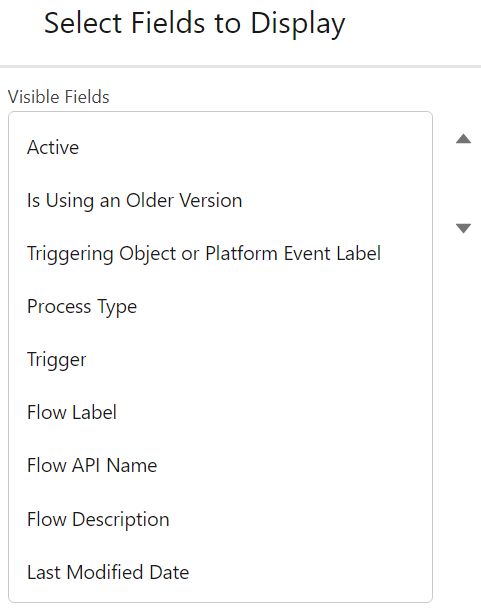This will allow you to easily find your flows by Object (apart from Scheduled Flows or Sub-Flows, but this is handled via Naming Conventions), see if you started working on a Flow but didn't activate the last version, and view the beautiful descriptions that you will have set everywhere. - One List View that shows all Package flows, which contains `Active, Is Using an Older Version, Flow Namespace, Overridable, Overridden By, Overrides` This allows you to easily manage your updates to these Flows that are sourced from outside your organization. #### **Flows are considered Code for maintenance purposes**Do NOT create or edit Flows in Production, especially a Record-Triggered flow. If any user does a data load operation and you corrupt swaths of data, you will know the meaning of “getting gray hairs”, unless you have a backup - which I am guessing you will not have if you were doing live edits in production.
No, this isn't a second helping of our note in the [General Notes](https://wiki.sfxd.org/books/best-practices/page/flow-general-notes). This is about your Flows - the ones you built, the ones you know very well and are proud of. There are a **swath** of reasons to consider Flows to be Code for maintenance purposes, but in short: - if you're tired, mess up, or are otherwise wrong, Production updates of Flows can have HUGE repercussions depending on how many users are using the platform, and how impactful your Flow is - updating Flows in Production will break your deployment lifecycle, and cause problems in CI/CD tools if you use them - updating Flows in Production means that you have no safe reproducibility environment unless you refresh a sandbox - unless you know every interaction with other parts of the system, a minor update can have impact due to other automation - whether it be APEX, or other Flows. In short - it's a short and admin-friendly development, but it's still development. #### **On which automation to create** In addition to our (frankly not very beautiful Flowchart), when creating automations, the order of priority should be: - 1. **Object-bound, BEFORE Flows** These are the most CPU-efficient Flows to create. They should be used to set information that is required on Objects that are created or updated. 2. **User-bound Flows** Meaning Screen flows. These aren’t tied to automation, and so are very CPU efficient and testable. 3. **Object-bound, Scheduled Flows** If you can, create your flows as a Schedule rather than something that will spend a lot of time waiting for an action - a great example of this are scheduled emails one month after something happens. Do test your batch before deploying it, though. 4. **Object-bound, AFTER Flows** These are last because they are CPU intensive, can cause recursion, and generally can have more impact in the org than other sources of automation. #### **On APEX and LWCs in Flows** - **APEX or LWCs that are specifically made to be called from Flows should be clearly named and defined in a way that makes their identification and maintenance easier.** - **Flows that call APEX or LWCs are subject to more limits and potential bugs than fully declarative ones.** When planning to do one, factor in the maintenance cost of these parts. Yes, this absolutely includes actions and components from the wonderful UnofficialSF. If you install unpackaged code in your organization, YOU are responsible for maintaining it. - On a related note, **Don't use non-official components without checking their limits.** Yes UnofficialSF is great, and it also contains components that are not bulkified or contain bugs.To reiterate, if you install unpackaged code in your organization, YOU are responsible for maintaining it.
#### **Flow Testing and Flow Tests** If at all possible, **Flows should be [Tested](https://help.salesforce.com/s/articleView?id=sf.flow_test.htm&type=5)**. This isn't always possible because of [these considerations](https://help.salesforce.com/s/articleView?id=sf.flow_considerations_feature_testing.htm&type=5), (which aren't actually exhaustive - I have personally seen edge cases where Tests fail but actual function runs, because of the way Tests are build, and I have also seen deployment errors linked to Tests). [Trailheads exist to help you get there](https://trailhead.salesforce.com/content/learn/modules/flow-testing-and-distribution/make-sure-your-flow-works).A Flow Test is **not** just a way to check your Flow works. A proper test should: - Test the Flow works - Test the Flow works in other Permission situations - Test the Flow **doesn't** work in critical situations you want to avoid \[if you're supposed to send one email, you should *probably catch the situation where you're sending 5* mil\] ... and in addition to that, a proper Flow Test will warn you **if things stop working down the line.** Most of these boilerplates are *negative bets against the future* - we are expecting things to break, people to forget configuration, and updates to be made out of process. Tests are a way to mitigate that.
We currently consider Flow Tests to be "acceptable but still bad", which we expect to change as time goes on, but as it's not a critical feature, we aren't sure when they'll address the current issues with the tool.
Note that proper Flow Testing will probably become a requirement at some point down the line. #### **On Bypasses** Flows, like many things in Salesforce, can be configured to respect [Bypasses](https://wiki.sfxd.org/books/best-practices/page/bypasses). In the case of Flows, you might want to call these "[feature flags](https://developer.salesforce.com/docs/atlas.en-us.packagingGuide.meta/packagingGuide/fma_best_practices.htm)". This is a GREAT best practice, but is generally overkill unless you are a very mature org with huge amounts of processes. # Flow Structural Conventions - Common Core As detailed in the General Notes section, these conventions are heavily opinionated towards maintenance and scaling in large organizations. The conventions contain: - a "common core" set of structural conventions that apply everywhere (this page!) - conventions for [Record Triggered Flows](https://wiki.sfxd.org/books/best-practices/page/flow-structural-conventions-record-triggered) specifically - conventions for [Scheduled Flows](https://wiki.sfxd.org/books/best-practices/page/flow-structural-conventions-scheduled) specifically Due to their nature of being triggered by the user and outside of a specific record context, Screen Flows do not require specific structural adaptations at the moment that are not part of the common core specifications. ## Common Core Conventions #### On System-Level Design ##### **Do not do DMLs or Queries in Loops.****Simpler: No pink squares in loops.**
**[DML](https://developer.salesforce.com/docs/atlas.en-us.apexref.meta/apexref/apex_dml_section.htm)** is Data Manipulation Language. Basically it is what tells the database to change stuff. DML Operations include Insert, Update, Upsert, and Delete, which you should know from Data Loader or other such tools.
Salesforce now actually warns you when you're doing this, but it still bears saying. *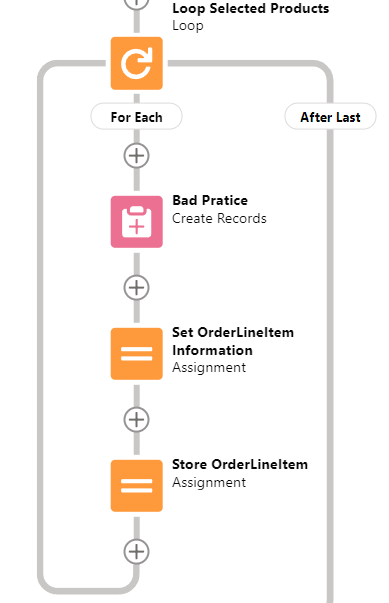Don't do this*Error, or Fault Paths, are available both in Free Design mode and the Auto-Layout Mode. In Free mode, you need to handle all possible other paths before the Fault path becomes available. In Auto-Layout mode, you can simply select Fault Path.
Screen Flow? Throw a Screen, and display what situation could lead to this. Maybe also send the Admin an email explaining what happened. 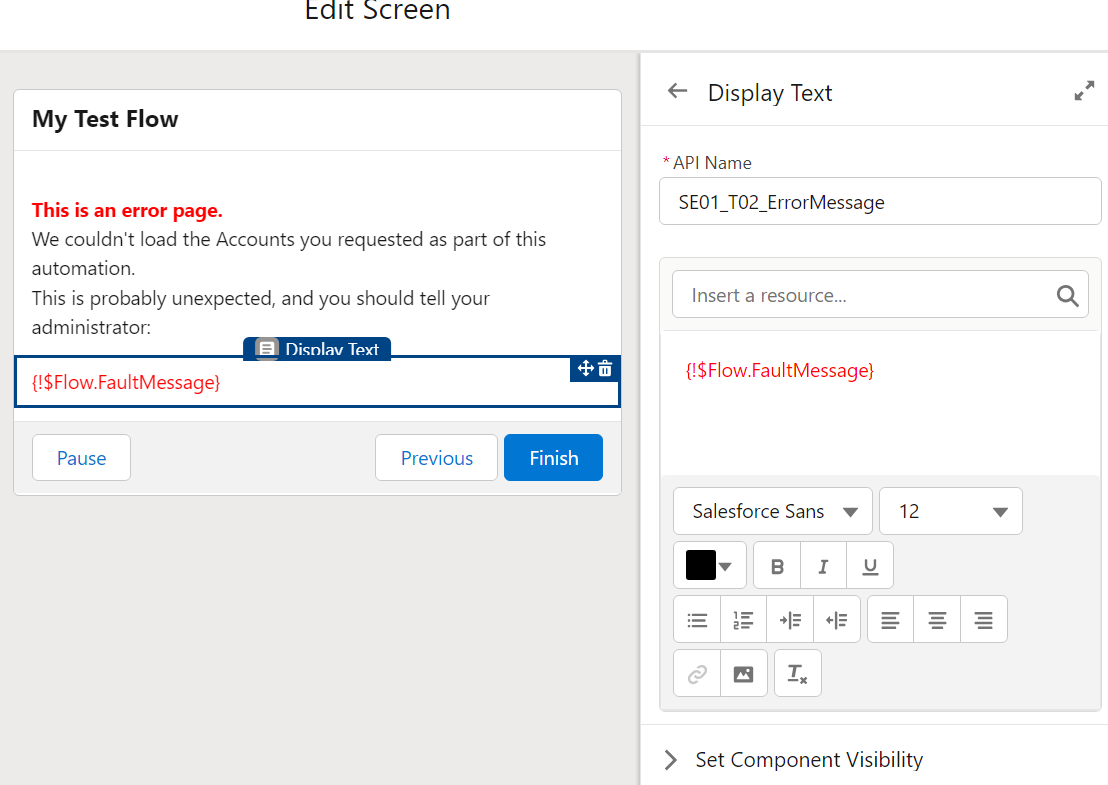Record-triggered Flow? [Throw an email](https://help.salesforce.com/s/articleView?id=sf.flow_ref_elements_actions_sendemail.htm&type=5) to the APEX Email Exception recipients, or emit a [Custom Notification](https://help.salesforce.com/s/articleView?id=sf.notif_builder_custom.htm&language=en_US&type=5). Hell, better yet throw that logic into a Subflow and call it from wherever.(Note that if you are in a sandbox with email deliverability set to System Only, regular flow emails and email alerts will not get sent.)
[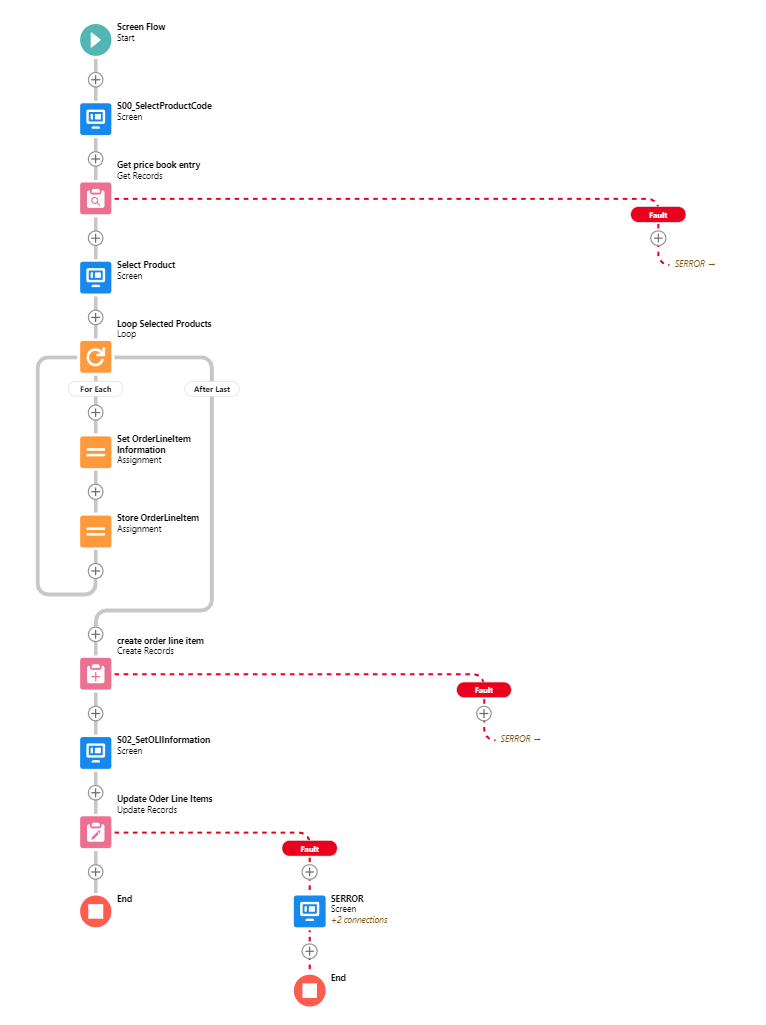](https://wiki.sfxd.org/uploads/images/gallery/2022-02/image-1644417882117.png)Handling Errors this way allows you to: - not have your users presented with UNEXPECTED EXCEPTION - YOUR ADMIN DID THINGS BADLY - maybe deflect a few error messages, in case some things can be fixed by the user doing things differently - have a better understanding of how often Errors happen.
You want to supercharge your error handling? Audit [Nebula Logger](https://github.com/jongpie/NebulaLogger) to see if it can suit your needs. With proper implementation (and knowledge of how to service it, remember that installed code is still code that requires maintenance), Nebula Logger will allow you to centralize **all** logs in your organization, and have proper notification when something happens - whether in Flow, APEX, or whatever. ##### **Don't exit loops based on decision checks** The Flow engine doesn't support that well and you will have weird and confusing issues if you ever go back to the main loop. 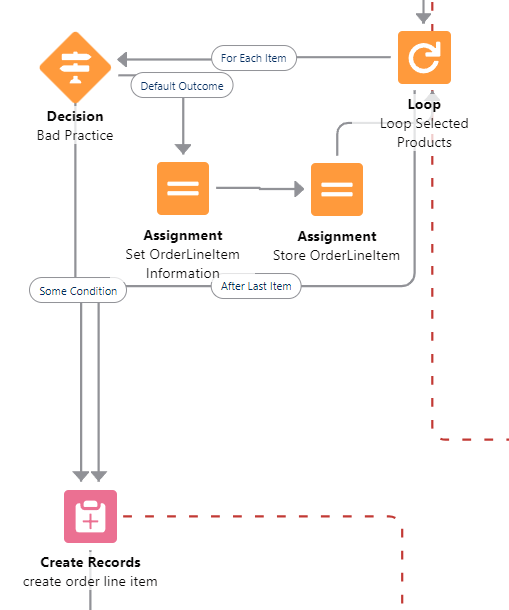 *Don’t do this either - always finish the loop* Issues include variables not being reset, DML errors if you do come back to the loop, and all around general unpredictable situations. You *can* still do this if you absolutely NEVER come back to the loop, but it's bad design. ##### **Do not design Flows that will have long Wait elements**This is often done by Admins coming from Workflow or Process Builder space, where you could just say "do that 1 week before contract end date" or "1 day after Opportunity closure". This design is sadly as outdated as the tools that permitted it. Doing this will have you exceed your Paused Interview limits, and actions just won't be carried out.
A proper handling of "1 day before/after whenever", in Flow, is often via a Scheduled Flow. Scheduled Flows execute once daily (or more if you use plugins to allow it), check conditions, and execute based on these conditions. In the above case, you would be creating a Scheduled Flow that : - Queries all Contract that have an End Date at `TODAY()-7` - Proceeds to loop over them and do whatever you need it toDespite it not being evident in the Salesforce Builder, there is a VERY big difference between the criteria in the Schedule Flow execution start, and an initial GET. - Putting criteria in the Start Element has less conditions available, but effectively limits the scope of the Flow to only these records, which is great in **big environments**. It also fires **One Flow Interview per Record**, and then bulkifies operations at the end - so doing a **GET** if you put a criteria in the Start element should be done after due consideration only. - On the opposite, putting no criteria and relying on an initial Get does a single Flow Interview, and so will run less effectively on huge amounts of records, *but* does allow you to handle more complex selection criteria.
##### **Do not Over-Optimize your Flows** When Admins start becoming great at Flows, everything looks like a Flow. The issue with that is that sometimes, Admins will start building Flows that shouldn't be built because Users should be using standard features (yes, I know, convincing Users to change habits can be nigh impossible but is sometimes still the right path)... and sometimes, they will keep at building Flows that just should be APEX instead.If you are starting to hit CPU timeout errors, Flow Element Count errors, huge amounts of slowness... You're probably trying to shove things in Flow that should be something else instead.
APEX has more tools than Flows, as do LWCs. Sometimes, admitting that Development is necessary is not a failure - it's just good design. #### On Flow-Specific Design ##### **Flows should have one easily identifiable Triggering Element** This relates to the [Naming Conventions](https://wiki.sfxd.org/books/best-practices/page/flow-naming-conventions).| **Flow Type** | **Triggering Element** |
| Record-Triggered Flows | It is the Record that triggers the DML |
| Event-based Flows | It should be a single event, as simple as possible. |
| Screen Flows | This should be either a single recordId, a single sObject variable, or a single sObject list variable. In all cases, the Flow that is being called should query what it needs by itself, and output whatever is needed in its context. |
| Subflows | The rule can vary - it can be useful to pass multiple collections to a Subflow in order to avoid recurring queries on the same object. However, passing multiple single-record variables, or single text variables, to a Subflow generally indicates a design that is overly coupled with the main flow and should be more abstracted. |
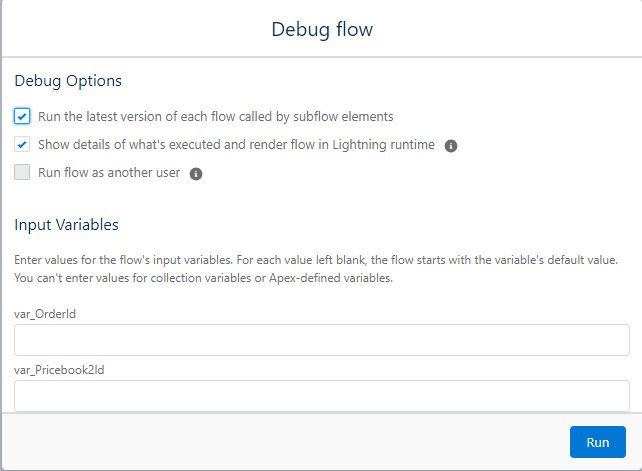
In the example below, the Pricebook2Id variable should be taken from the Order variable.
[](https://wiki.sfxd.org/uploads/images/gallery/2022-02/image-1644417918698.png) ##### **Try to make Subflows that are reusable as possible**. A Subflow that does a lot of different actions will probably be single-use, and if you need a subpart of it in another logic, you will probably build it again, which may lead to higher technical debt. If at all possible, each Subflow should execute a single function, within a single Domain. Yes, this ties into "[service-based architecture](https://en.wikipedia.org/wiki/Service-oriented_architecture)" - we did say Flows were code. ##### **Do not rely on implicit references** This is when you query a record, then fetch parent information via {MyRecord.ParentRecord\_\_c.SomeField\_\_c}. While this is *useful*, it’s also very prone to errors (specifically with fields like RecordType ) and makes for wonky error messages if the User does not have access to one of the intermediary records. Do an explicit Query instead if possible, even if it is technically slower. ##### **Tie each Flow to a Domain** This is also tied to Naming Conventions. Note that in the example below, the Domain is the Object that the Flow lives on. One might say it is redundant with the Triggering Object, except Scheduled Flows and Screen Flows don't have this populated, and are often still linked to specific objects, hence the explicit link. Domains are definable as **Stand-alone groupings of function which have a clear Responsible** [**Persona**](https://trailhead.salesforce.com/content/learn/modules/ux-personas-for-salesforce/get_started_with_personas)**.** **[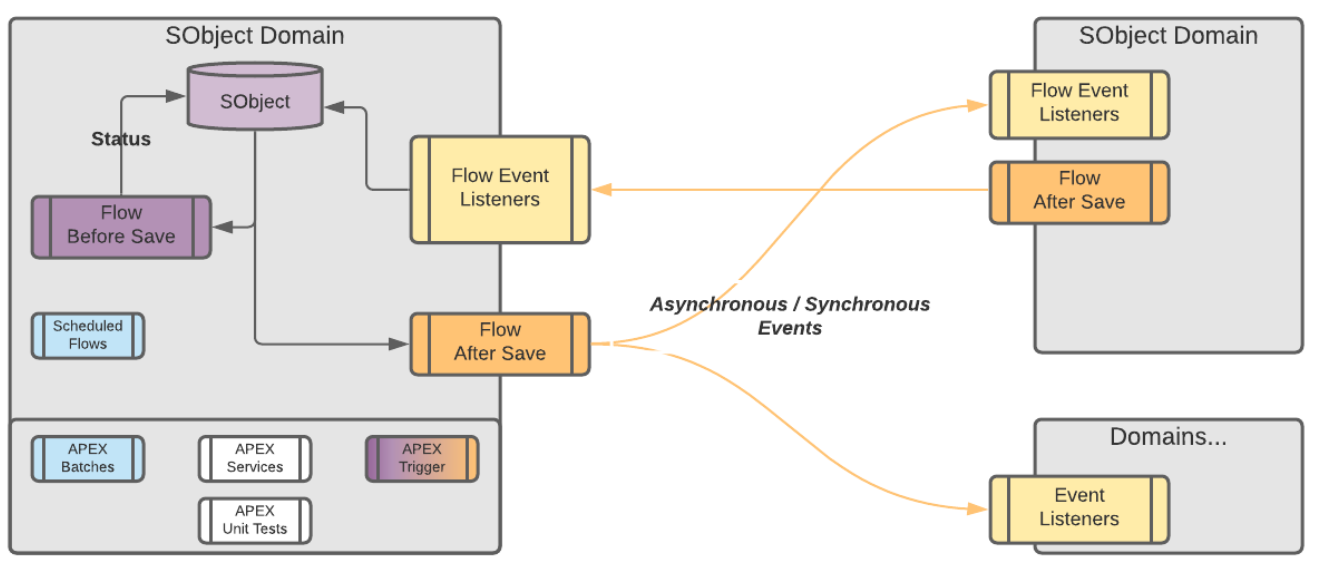](https://wiki.sfxd.org/uploads/images/gallery/2022-02/image-1644417943258.png)** ##### **Communication between Domains should ideally be handled via Events** In short, if a Flow starts in Sales (actions that are taken when an Opportunity closes for example) and finishes in Invoicing (creates an invoice and notifies the people responsible for those invoices), this should be two separate Flows, each tied to a single Domain.Note that the Salesforce Event bus is mostly built for External Integrations. The amount of events we specify here is quite high, and as such on gigantic organisations it might not be best practice to handle things this way - you might want to rely on an external event bus instead. That being said if you are in fact an enterprise admin I expect you are considering the best usecase in every practice you implement, and as such this disclaimer is unnecessary.
[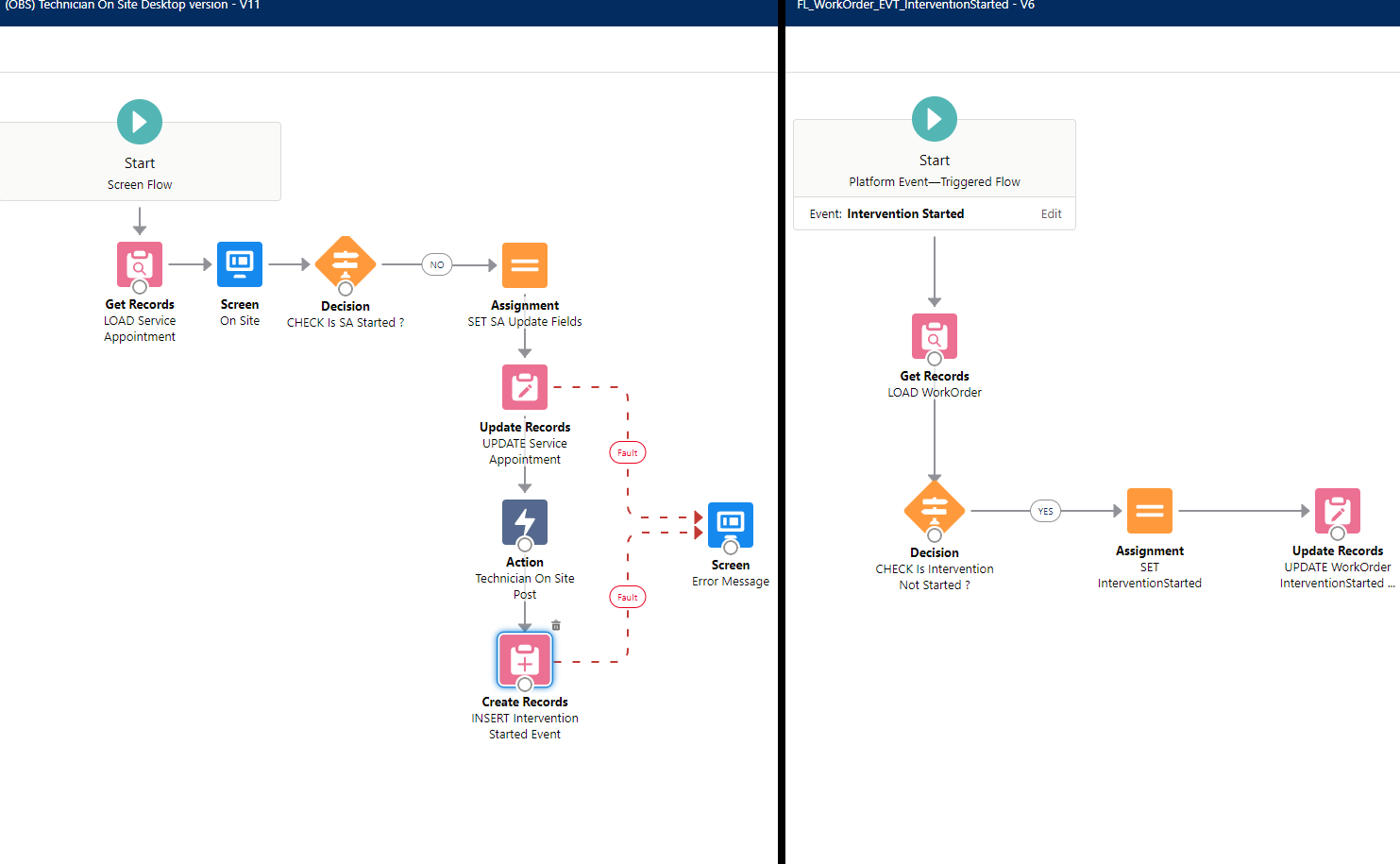](https://wiki.sfxd.org/uploads/images/gallery/2022-02/image-1644417931475.png) *Example of Event-Driven decoupling* ##### **Avoid cascading Subflows wherein one calls another one that call another one** Unless the secondary subflows are basically fully abstract methods handling inputs from any possible Flow (like one that returns a collection from a multipicklist), you're adding complexity in maintenance which will be costly # Flow Structural Conventions - Record-Triggered As detailed in the General Notes section, these conventions are heavily opinionated towards maintenance and scaling in large organizations. The conventions contain: - a "[common core](https://wiki.sfxd.org/books/best-practices/page/flow-structural-conventions-common-core)" set of structural conventions that apply everywhere - conventions for Record Triggered Flows specifically (this page!) - conventions for [Scheduled Flows](https://wiki.sfxd.org/books/best-practices/page/flow-structural-conventions-scheduled) specificallyThis page directly changes conventions that were emitted by SFXD in 2019, and reiterated in 2021. This is because the platform has changed since then, and as such we are recommending new, better, more robust way to build stuff. If you recently used our old guides - they are still fine, we just consider this new version to be better practice.
## Record-Triggered Flow Design #### Before Creating a Flow ##### Ensure there are no sources of automation touching the Object or Fields If the same field is updated in another automation, default to that automation instead, or refactor that automation to Flow. If the Object is used in other sources of automation, you might want to default to that as well, or refactor that automation to Flow, unless you can ensure that both that source of automation and the Flow you will create will not cross-impact each other.You can leverage "where is this used" in sandbox orgs to check if a field is already referenced in a Flow - or take the HULK SMASH approach and just create a new sandbox, and try to delete the field. If it fails deletion, it'll tell you where it is referenced.
##### Verify the list of existing Flows and Entry Criterias you have You don't want to have multiple sources of the same entry criteria in Flows because it will make management harder, and you also don't want to have multiple Flows that do almost the same thing because of scale.Identifying if you can refactor a Flow into a Subflow that will be called from multiple places is best done before trying to build anything.
##### Ask yourself if it can't be a Scheduled Flow instead Anything date based, anything that has wait times, anything that doesn't need to be at the instant the record changes status but can instead wait a few hours for the flow to run - all these things can be scheduled Flows. This will allow you to have better save times on records. ##### Prioritize BEFORE-save operations whenever possible This is more efficient in every way for the database, and avoids recurring SAVE operations. It also mostly avoid impacts from other automation sources (apart from Before-Save APEX). Designing your Flow to have the most possible before-save elements will save you time and effort in the long run. ##### Check if you need to update your bypasses Specifically for Emails, using [bypasses](https://wiki.sfxd.org/books/best-practices/page/bypasses) remains something that is important. Because sending emails to your entire database when you're testing stuff is probably not what you want. ##### Consider the worst case Do not build your system for the best user but the worst one. Ensure that faults are handled, ensure that a suser subject to every single piece of automation still has a usable system, etc. #### On the number of Flows per Object and Start Elements - **Before-Save Flows** Use **as many before-save flows as you require**. You *should*, but do not *have to*, set Entry Conditions on your Flows. Each individual Flow should be tied to a **functional Domain**, or a specific **user story**, as you see most logical. The order of the Flows in the Flow Trigger Explorer should not matter, as a single field should **never** be referenced in multiple before save flows as the target of an assignment or update. - **After-Save Flows **Use **one** Flow for actions that should trigger without entry criteria, and orchestrate them with Decision elements. Use **one** Flow to handle **Email Sends** if you have multiple email actions on the Object and need to orchestrate them. Use **as many additional flows as you require, as long as they are tied to unique Entry Criteria**. Set the Order of the Flows **manually in the Flow Trigger Explorer** to ensure you know how these elements chain together.Offload any computationally complex operation that **doesnt need to be done immediately to a scheduled** path.Entry Criteria specify when a Flow is *evaluated*. It is a very efficient way to avoid Flows triggering unduly and saves a lot of CPU time. Entry Criteria however do require knowledge of Formulas to use fully (the basic "AND" condition doesn't allow a few things that the Formula editor does in fact handle properly), and it is important to note that the entire Flow does not execute if the Entry Criteria isn't met, so you can't catch errors or anything.
To build open what's written above: - Before-Save flows are very fast, generally have no impact on performance unless you do very weird stuff, and should be easy to maintain as log as you name them properly, even if you have multiple per object. "Tieing" a flow to a Domain or Object means by its name and structure. You can technically do a Flow that does updates both for Sales and Invoicing, but this is generally meh if you need to update a specific function down the line.Logical separation of responsabilities is a topic you'll find not only here but also in a lot of development books.
Before-Save Flows don't actually require an Update element - this is just for show and to allow people to feel more comfortable with it. You can technically just use Assignments to manipulate the `$Record` variable with the same effect. *It actually used to be the only way to do before-save, but was thought too confusing.*
- After-Save flows, while more powerful, require you to do another DML operation to commit anything you are modifying. This has a few impacts, such as the possibility to re-run automtions if you update the record that already triggered your automation. The suggestions we make above are based on the following: - Few actions on records should not have entry criteria set. This allows more flows to be present on each object without slowdowns. The limit of One flow is because it should pretty much not exist, or be small. - Emails sent from Objects are always stress inducing in case of data loads, and while a proper bypass usage does not require grouping all emails in a Flow,knowing that all email alerts are in a specific place does make maintenance easier. - Entry-Criteria filtered Flows are quite efficient, and so do not need to be restricted in number anymore. - Ordering Flows manually is to avoid cases where the order of Flows is unkown, and interaction between Flows that you ahve not identified yields either positive or negative results that can't be reproduced without proper ordering. - Scheduled Paths are great if you are updating related Objects, sending notifications, or doing any other operation that isn't time-sensitive for the user.We used to recommend a single Flow per context. This is obviously no longer the case. This is because anything that pattern provided, other tools now provide, and do better. The "One flow per Object pattern" was born because: - Flows only triggered in `after` contexts - Flows didn't have a way to be orchestrated between themselves - Performance impact of Flows was huge because of the lack of entry criteria None of that is true anymore. The remnant of that pattern still exists in the "no entry criteria, after context, flow that has decision nodes", so it's not completely gone. So while the advent of Flow Trigger Explorer was one nail in the coffin for that pattern, the real final one was actual good entry criteria logic.
Entry Criteria are awesome but are not properly disclosed either in the Flow List View, nor the Start Element. Ensure that you follow proper Description filling so you can in fact know how these elements work, otherwise you will need to open every single Flow to check what is happening.
## On Delayed Actions Flows allows you to do complex queries and loops as well as schedules. As such, there is virtually no reason to use wait elements or delayed actions, unless said waits are for a platform event, or the delayed actions are relatively short. Any action that is scheduled for a month in the future for example should instead set a flag on the record, and let a Scheduled Flow evaluate the records daily to see if they fit criteria for processing. If they do in fact fit criteria, then execute the action. A great example of this is Birthday emails - instead of triggering an action that waits for a year, do a Scheduled flow running daily on contacts who's birthday it is. This makes it a lot easier to debug and see what’s going on. # Flow Structural Conventions - Scheduled As detailed in the General Notes section, these conventions are heavily opinionated towards maintenance and scaling in large organizations. The conventions contain: - a "[common core](https://wiki.sfxd.org/books/best-practices/page/flow-structural-conventions-common-core)" set of structural conventions that apply everywhere - conventions for [Record Triggered Flows ](https://wiki.sfxd.org/books/best-practices/page/flow-structural-conventions-record-triggered)specifically - conventions for Scheduled Flows specifically (this page!) ## Scheduled Flow Design As detailed in the Common Core conventions, despite it not being evident in the Salesforce Builder, there is a VERY big difference between the criteria in the Schedule Flow execution start, and an initial GET element in a Scheduled Flow that has no Object defined. \- Putting criteria in the Start Element has less conditions available, but effectively limits the scope of the Flow to only these records, which is great in **big environments**. It also fires **One Flow Interview per Record**, and then bulkifies operations at the end. 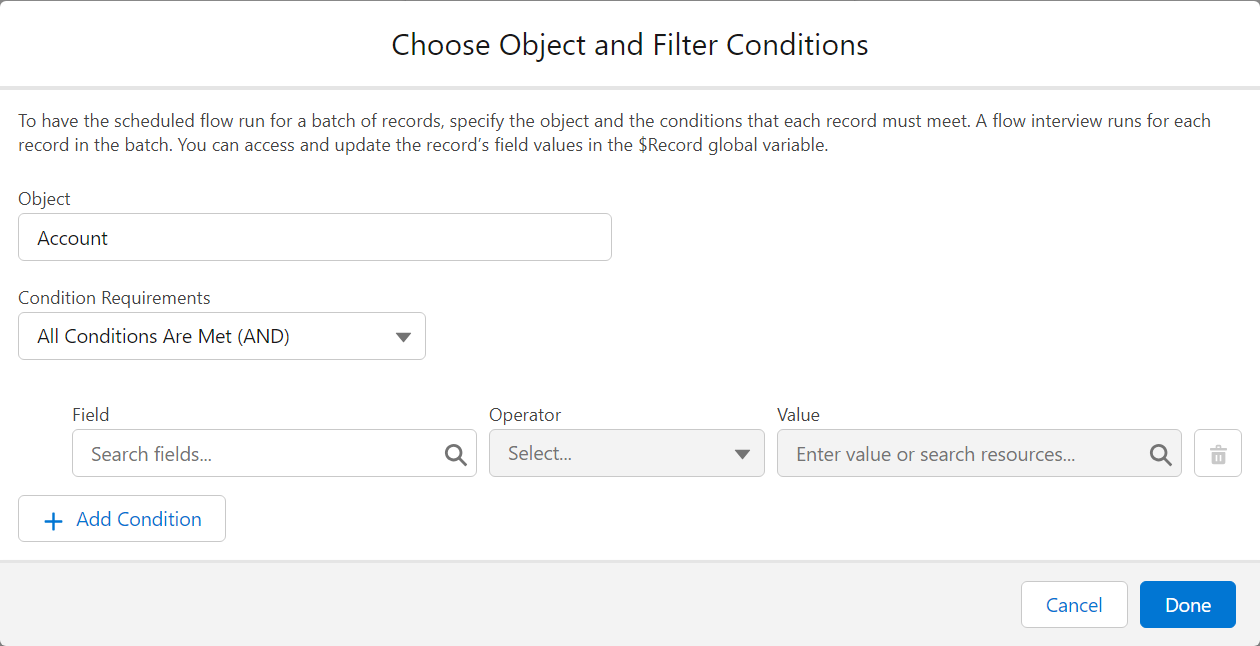An often-done mistake is to do the above selection, say "Accounts where Active = TRUE" for example, and then doing a Get Records afterwards, querying the accounts again, because of habits tied to Record-Triggered Flows. If you do this, you are effectively querying the entire list of Accounts X times, where X is the number of Accounts in your original criteria. Which is bad.
\- On the opposite, putting no criteria and relying on an initial Get does a single Flow Interview, and so will run less effectively on huge amounts of records, *but* does allow you to handle more complex selection criteria. 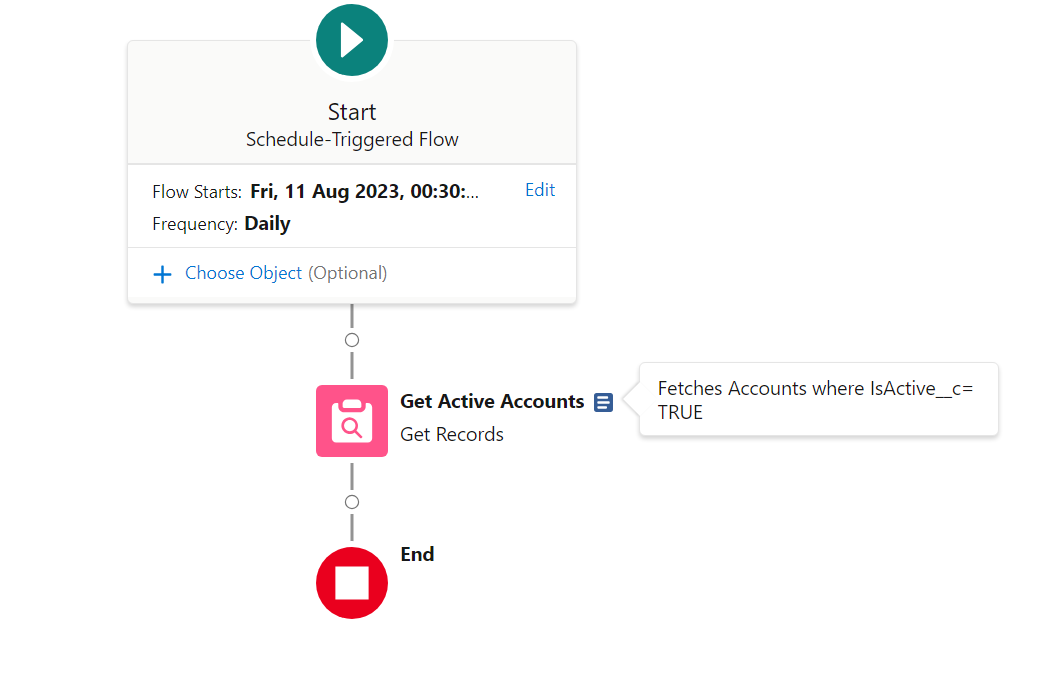In the first case, you should consider that there is only one record selected by the Flow, which is populated in `$Record` - much like in Record-Triggered Flows. In the second screenshot, you can see that the Choose Object is empty, but the GET is done afterwards - `$Record` is as such empty, but the Get Active Accounts will generate a collection variable containing multiple accounts, which you will need to iterate over (via a `loop` element) to handle the different cases
# Flow Naming Conventions ## Meta-Flow Naming 1. A Flow name shall always start by the name of the **Domain from which it originates**, followed by an underscore. **In most cases, for Flows, the Domain is equivalent to the Object that it is hosted on**. As per structural conventions, cross-object Flows should be avoided and reliance on Events to synchronize flows that do cross-object operations should be used.In `Account_BeforeSave_SetClientNumber`, the Domain is Account, as this is where the automation is started. It could also be something like `AccountManagement` , if the Account Management team owned the process for example.
2. The Domain of the shall be followed by a code indicating the type of the Flow, respecting the cases as follows: 1. If the flow is a Screen Flow, the code shall be **SCR**. 2. If the flow is a SubFlow, the code shall be **SFL**. 3. If the flow is specifically designed to be a scheduled flow that runs on a schedule, the code shall be **SCH**. 4. If the flow is a Record Triggered flow, the code shall instead indicate the contexts in where the Record Triggered Flow executes. In addition, the flow name shall contain the context of execution, meaning either **Before**or **After**, followed by either **Create**, **Update** or **Delete**. 5. If the flow is an Event Triggered flow, the code shall be **EVT** instead. 6. If the flow is specifically designed to be a Record Triggered flow that ONLY handles email sends, the code shall be **EML** instead.In `Account_AftercreateAftersave_StatusUpdateActions`, you identify that it is Record-Triggered, execute both on creation and update, in the After Context, and that it carries out actions related to when the entry criteria (the status has changed) are met.
In the case of `Invoice_SCR_CheckTaxExemption`, you know that it is a Screen Flow, executing from the Invoice Lightning Page, that handles Tax Exemption related matters.
3. A Flow name shall further be named after the action being carried out in the most precise manner possible. For Record Triggered Flows, this is limited to what triggers it. See example table for details. 4. A Flow Description should always indicate what the Flow requires to run, what the entry criteria are, what it does functionally, and what it outputs.| Type | Name | Description |
|---|---|---|
| Screen Flow | Quote\_SCR\_addQuoteLines | \[Entry = None\] A Screen flow that is used to override the Quote Lines addition page. Provides function related to Discount calculation based on Discounts\_cmtd. |
| Scheduled Flow | Contact\_SCH\_SendBirthdayEmails | \[Entry = None\] A Scheduled flow that runs daily, checks if a contact is due a Birthday email, and sends it using the template marked Marketing\_Birthday |
| Before Update Flow, on Account | Account\_BeforeUpdate\_SetTaxInformation | \[Entry = IsChanged(ShippingCountry)\] Changes the tax information, rate, and required elements based on the new country. |
| After Update Flow, on Account | Account\_AfterUpdate\_NewBillingInfo | \[Entry = IsChanged(ShippingCountry)\] Fetches related future invoices and updates their billing country and billing information. Also sends a notification to Sales Support to ensure country change is legitimate. |
| Event-Triggered Flow, creating Invoices, which triggers when a Sales Finished event gets fired | Invoice\_EVT\_SalesFinished | Creates an Invoice and notifies Invoicing about the new invoice to validate based on Sales information |
| Record-triggered Email-sending Flow, on Account. | Account\_EML\_AfterUpdate | \[Entry = None\] Handles email notifications from Account based on record changes. |
| Type | Name | Description |
|---|---|---|
| Get accounts matching active = true | Get\_ActiveAccounts | Fetches all accounts where IsActive = True |
| Update Modified Contacts | Update\_ListModifiedContacts | Commits all changes from previous assignments to the database |
| Creates an account configured during a Screen Flow in a variable called `var_thisAccount` | Create\_ThisAccount | Commits the Account to the database based on previous assignments. |
| Type | Name | Description |
|---|---|---|
| Screen within a Flow | Label: Select Price Book Entries Name: S01\_SelectPBEs | Allows selection of which products will be added to the quote, based on pricebookentries fetched. |
| Screen that handles errors based on a DML within a Flow | SERR01\_GET\_PBE | Happens if the GET on Pricebook Entries fails. Probably related to Permissions. |
| Text element in the first screen of the flow | S01\_T01 | *Fill with actual Text from the Text element - there is no description field* |
| DataTable in the first screen of the flow | S01\_LWCTable\_Products | *May be inapplicable as the LWCs may not offer a Description field.* |
| Type | Name | Description |
|---|---|---|
| Formula to get the total number of Products sold | formula\_ProductDiscountWeighted | Weights the discount by product type and calculates actual final discount. Catches null values for discounts or prices and returns 0. |
| Variable to store the recordId | recordId | Stores the record Id that starts the flow. *Exempt from normal conventions because legacy Salesforce behavior.* *Note: This var name is CASE SENSITIVE.* |
| Record that we create from calculated values in the Flow in a Loop, before storing it in a collection variable to create them all | sObj\_This\_OpportunityProduct | The Opportunity Product the values of which we calculate. |
| Type | Name | Description |
|---|---|---|
| Assignment to set the sObj\_This\_OpportunityProduct record values | SET\_OppProdValues | Sets the OppProd based on calculated discounts and quantities. |
| Assignment to store the Opportunity Product for later creation in a collection variable | Name: STORE\_ThisOppProd Assignment: {!sObj\_coll\_OppProdtoCreate} Add {!sObj\_This\_OpportunityProduct} | Adds the calculated Opp Prod lines to the collvar to create. |
| DML to create multiple records store in a collection sObj variable | CREATE\_OppProds | Creates the configured OppProd. |
| Decision to check selected elements for processing | Decision: CHECK\_PBESelected Outcome one: CHECK\_PBESelected\_Yes Outcome two: CHECK\_PBESelected\_No Default Outcome: Catastrophic Failure | Check if at least one row was selected. Otherwise terminates to an error screen. |
| Decision to sort elements based on criteria | Decision: DEC\_SortOverrides Outcome one: SortOverrides\_Fields Outcome two: SortOverrides\_Values Outcome three: SortOverrides\_Full Default Outcome: Catastrophic Failure | Based on user selection, check if we need to override information within the records, and which information needs to be overridden. |
| Email Alert sent from Flow informing user of Invoice reception | EA01\_EI10\_InvoiceReceived | Sends template EI10 with details of the Invoice to pay |