# Flow Naming Conventions

## <span class="fabric-editor-annotation" data-id="71c143c4-f0a7-41be-bcba-d51621c1296e" data-mark-annotation-type="inlineComment" data-mark-type="annotation">Meta-Flow Naming</span>

1. A Flow name shall always start by the name of the **Domain from which it originates**, followed by an underscore.  
    **In most cases, for Flows, the Domain is equivalent to the Object that it is hosted on**.  
    As per structural conventions, cross-object Flows should be avoided and reliance on Events to synchronize flows that do cross-object operations should be used.
    
    
    <p class="callout info">In `Account_BeforeSave_SetClientNumber`, the Domain is Account, as this is where the automation is started. It could also be something like `AccountManagement` , if the Account Management team owned the process for example.  
    </p>
2. The Domain of the shall be followed by a code indicating the type of the Flow, respecting the cases as follows:
    
    
    1. If the flow is a Screen Flow, the code shall be **<span class="code" spellcheck="false">SCR</span>**.
    2. If the flow is a SubFlow, the code shall be **<span class="code" spellcheck="false">SFL</span>**.
    3. If the flow is specifically designed to be a scheduled flow that runs on a schedule, the code shall be **<span class="code" spellcheck="false">SCH</span>**.
    4. If the flow is a Record Triggered flow, the code shall instead indicate the contexts in where the Record Triggered Flow executes.  
        In addition, the flow name shall contain the context of execution, meaning either **<span class="code" spellcheck="false">Before</span>**or **<span class="code" spellcheck="false">After</span>**, followed by either **<span class="code" spellcheck="false">Create</span>**, **<span class="code" spellcheck="false">Update</span>** or **<span class="code" spellcheck="false">Delete</span>**.
    5. If the flow is an Event Triggered flow, the code shall be **<span class="code" spellcheck="false">EVT</span>** instead.
    6. If the flow is specifically designed to be a Record Triggered flow that ONLY handles email sends, the code shall be **<span class="code" spellcheck="false">EML</span>** instead.
        
        
        <p class="callout info">In `Account_AftercreateAftersave_StatusUpdateActions`, you identify that it is Record-Triggered, execute both on creation and update, in the After Context, and that it carries out actions related to when the entry criteria (the status has changed) are met.  
        </p>
        
        
        <p class="callout info">In the case of `Invoice_SCR_CheckTaxExemption`, you know that it is a Screen Flow, executing from the Invoice Lightning Page, that handles Tax Exemption related matters.  
        </p>
3. A Flow name shall further be named after the action being carried out in the most precise manner possible. For Record Triggered Flows, this is limited to what triggers it. See example table for details.
4. A Flow Description should always indicate what the Flow requires to run, what the entry criteria are, what it does functionally, and what it outputs.

<table data-autosize="false" data-layout="full-width" data-number-column="false" data-table-local-id="564a5e3f-0bda-4fa2-a776-f724eabd9b85" id="bkmrk-type-name-descriptio" style="width: 100%; height: 774.467px;"><tbody><tr style="height: 35.1167px;"><th class="pm-table-header-content-wrap" data-colwidth="226.67" style="width: 25.2088%; height: 35.1167px;">Type

</th><th class="pm-table-header-content-wrap" data-colwidth="226.67" style="width: 35.5857%; height: 35.1167px;">Name

</th><th class="pm-table-header-content-wrap" data-colwidth="226.67" style="width: 39.294%; height: 35.1167px;">Description

</th></tr><tr style="height: 125.083px;"><td class="pm-table-cell-content-wrap" data-colwidth="226.67" style="width: 25.2088%; height: 125.083px;"><span class="fabric-editor-annotation" data-id="b700144e-e92f-410f-bd7a-3682e7ced376" data-mark-annotation-type="inlineComment" data-mark-type="annotation">Screen Flow</span>

</td><td class="pm-table-cell-content-wrap" data-colwidth="226.67" style="width: 35.5857%; height: 125.083px;">Quote\_SCR\_addQuoteLines

</td><td class="pm-table-cell-content-wrap" data-colwidth="226.67" style="width: 39.294%; height: 125.083px;">\[Entry = None\]  
A Screen flow that is used to override the Quote Lines addition page. Provides function related to Discount calculation based on <span class="code" spellcheck="false">Discounts\_cmtd</span>.

</td></tr><tr style="height: 125.083px;"><td class="pm-table-cell-content-wrap" data-colwidth="226.67" style="width: 25.2088%; height: 125.083px;">Scheduled Flow

</td><td class="pm-table-cell-content-wrap" data-colwidth="226.67" style="width: 35.5857%; height: 125.083px;">Contact\_SCH\_SendBirthdayEmails

</td><td class="pm-table-cell-content-wrap" data-colwidth="226.67" style="width: 39.294%; height: 125.083px;">\[Entry = None\]  
A Scheduled flow that runs daily, checks if a contact is due a Birthday email, and sends it using the template marked <span class="code" spellcheck="false">Marketing\_Birthday</span>

</td></tr><tr style="height: 79.9167px;"><td class="pm-table-cell-content-wrap" data-colwidth="226.67" style="width: 25.2088%; height: 79.9167px;">Before Update Flow, on Account

</td><td class="pm-table-cell-content-wrap" data-colwidth="226.67" style="width: 35.5857%; height: 79.9167px;">Account\_BeforeUpdate\_SetTaxInformation

</td><td class="pm-table-cell-content-wrap" data-colwidth="226.67" style="width: 39.294%; height: 79.9167px;">\[Entry = IsChanged(ShippingCountry)\]

Changes the tax information, rate, and required elements based on the new country.

</td></tr><tr style="height: 124.717px;"><td class="pm-table-cell-content-wrap" data-colwidth="226.67" style="width: 25.2088%; height: 124.717px;">After Update Flow, on Account

</td><td class="pm-table-cell-content-wrap" data-colwidth="226.67" style="width: 35.5857%; height: 124.717px;">Account\_AfterUpdate\_NewBillingInfo

</td><td class="pm-table-cell-content-wrap" data-colwidth="226.67" style="width: 39.294%; height: 124.717px;">\[Entry = IsChanged(ShippingCountry)\]  
Fetches related future invoices and updates their billing country and billing information.  
Also sends a notification to Sales Support to ensure country change is legitimate.

</td></tr><tr style="height: 102.317px;"><td class="pm-table-cell-content-wrap" data-colwidth="226.67" style="width: 25.2088%; height: 102.317px;">Event-Triggered Flow, creating Invoices, which triggers when a Sales Finished event gets fired

</td><td class="pm-table-cell-content-wrap" data-colwidth="226.67" style="width: 35.5857%; height: 102.317px;">Invoice\_EVT\_SalesFinished

</td><td class="pm-table-cell-content-wrap" data-colwidth="226.67" style="width: 39.294%; height: 102.317px;">Creates an Invoice and notifies Invoicing about the new invoice to validate based on Sales information

</td></tr><tr style="height: 57.5167px;"><td class="pm-table-cell-content-wrap" data-colwidth="226.67" style="width: 25.2088%; height: 57.5167px;">Record-triggered Email-sending Flow, on Account.

</td><td class="pm-table-cell-content-wrap" data-colwidth="226.67" style="width: 35.5857%; height: 57.5167px;">Account\_EML\_AfterUpdate

</td><td class="pm-table-cell-content-wrap" data-colwidth="226.67" style="width: 39.294%; height: 57.5167px;">\[Entry = None\]  
Handles email notifications from Account based on record changes.

</td></tr></tbody></table>

## Flow Elements

#### <span class="fabric-editor-annotation" data-id="cc2f579c-cb53-46f8-b144-b5dc9638f206" data-mark-annotation-type="inlineComment" data-mark-type="annotation">DMLs</span>

1. Any Query shall always start by <span class="code" spellcheck="false">Get</span>for any Objects, followed by an underscore, or <span class="code" spellcheck="false">Fetch</span>for CMTD or Settings.
2. Any Update shall always start by <span class="code" spellcheck="false">Update</span>followed by an underscore. If it Updates a Collection, it shall also be prefixed by <span class="code" spellcheck="false">List</span>after the aforementioned underscore.
3. Any Create shall always start by <span class="code" spellcheck="false">Create</span>followed by an underscore. If it Creates a Collection, it shall also be prefixed by <span class="code" spellcheck="false">List</span>after the aforementioned underscore.
4. Any Delete shall always start by <span class="code" spellcheck="false">Del</span>followed by an underscore. If it Deletes a Collection, it shall also be prefixed by <span class="code" spellcheck="false">List</span>after the aforementioned underscore.

<table border="1" id="bkmrk-type-name-descriptio-0" style="border-collapse: collapse; width: 100%; height: 140.467px;"><tbody><tr style="height: 35.1167px;"><th class="pm-table-header-content-wrap" data-colwidth="226.67" style="width: 33.3629%; height: 35.1167px;">Type

</th><th class="pm-table-header-content-wrap" data-colwidth="226.67" style="width: 25.9554%; height: 35.1167px;">Name

</th><th class="pm-table-header-content-wrap" data-colwidth="226.67" style="width: 40.7703%; height: 35.1167px;">Description

</th></tr><tr style="height: 29.5167px;"><td style="width: 33.3629%; height: 29.5167px;">Get accounts matching active = true  
</td><td style="width: 25.9554%; height: 29.5167px;">Get\_ActiveAccounts  
</td><td style="width: 40.7703%; height: 29.5167px;">Fetches all accounts where IsActive = True  
</td></tr><tr style="height: 46.3167px;"><td style="width: 33.3629%; height: 46.3167px;">Update Modified Contacts  
</td><td style="width: 25.9554%; height: 46.3167px;">Update\_ListModifiedContacts  
</td><td style="width: 40.7703%; height: 46.3167px;">Commits all changes from previous assignments to the database  
</td></tr><tr style="height: 29.5167px;"><td style="width: 33.3629%; height: 29.5167px;">Creates an account configured during a Screen Flow in a variable called `var_thisAccount`  
</td><td style="width: 25.9554%; height: 29.5167px;">Create\_ThisAccount  
</td><td style="width: 40.7703%; height: 29.5167px;">Commits the Account to the database based on previous assignments.</td></tr></tbody></table>

#### Interactions

1. Any Screen ***SHALL*** always start by <span class="code" spellcheck="false">S</span>, followed by a number corresponding to the current number of Screens in the current Flow plus 1, followed by an underscore.
2. Any Action ***SHALL*** always start by <span class="code" spellcheck="false">ACT</span>, followed by an underscore. The Action Name ***SHOULD*** furthermore indicate what the action carries out.
    
    
    - Any APEX Action ***SHALL*** always start by <span class="code" spellcheck="false">APEX</span> instead, followed by an underscore, followed by a shorthand of the outcome expected. Properly named APEX functions should be usable as-is for naming.
    - Any Subflow ***SHALL*** always start by <span class="code" spellcheck="false">SUB</span> instead, followed by an underscore, followed by the code of the Flow triggered (FL01 for example), followed by an underscore, followed by a shorthand of the outcome expected.
3. Any Email Alert ***SHALL*** always start by <span class="code" spellcheck="false">EA</span>, followed by an underscore, followed by the code of the Email Template getting sent, an underscore, and a shorthand of what email should be sent.

<table data-autosize="false" data-layout="full-width" data-number-column="false" data-table-local-id="e7ecba1c-b959-4bb9-9c90-1c2eb4597b39" id="bkmrk-type-name-descriptio-1"><tbody><tr><th class="pm-table-header-content-wrap" data-colwidth="226.67">Type

</th><th class="pm-table-header-content-wrap" data-colwidth="226.67">Name

</th><th class="pm-table-header-content-wrap" data-colwidth="226.67">Description

</th></tr><tr><td class="pm-table-cell-content-wrap" data-colwidth="226.67">Screen within a Flow

</td><td class="pm-table-cell-content-wrap" data-colwidth="226.67">Label: Select Price Book Entries

Name: S01\_SelectPBEs

</td><td class="pm-table-cell-content-wrap" data-colwidth="226.67">Allows selection of which products will be added to the quote, based on pricebookentries fetched.

</td></tr><tr><td class="pm-table-cell-content-wrap" data-colwidth="226.67">Screen that handles errors based on a DML within a Flow

</td><td class="pm-table-cell-content-wrap" data-colwidth="226.67">SERR01\_GET\_PBE

</td><td class="pm-table-cell-content-wrap" data-colwidth="226.67">Happens if the GET on Pricebook Entries fails. Probably related to Permissions.

</td></tr><tr><td class="pm-table-cell-content-wrap" data-colwidth="226.67">Text element in the first screen of the flow

</td><td class="pm-table-cell-content-wrap" data-colwidth="226.67">S01\_T01

</td><td class="pm-table-cell-content-wrap" data-colwidth="226.67">*Fill with actual Text from the Text element - there is no description field*

</td></tr><tr><td class="pm-table-cell-content-wrap" data-colwidth="226.67">DataTable in the first screen of the flow

</td><td class="pm-table-cell-content-wrap" data-colwidth="226.67">S01\_LWCTable\_Products

</td><td class="pm-table-cell-content-wrap" data-colwidth="226.67">*May be inapplicable as the LWCs may not offer a Description field.*

</td></tr></tbody></table>

<div data-layout="center" data-node-type="mediaSingle" data-width="" id="bkmrk-example-of-a-readabl"></div><div data-layout="center" data-node-type="mediaSingle" data-width="95" id="bkmrk-exmaple-of-a-screen-"><div data-alt="" data-collection="contentId-2533392399" data-context-id="2533392399" data-file-mime-type="image/png" data-file-name="image-20211223-163317.png" data-file-size="12543" data-height="201" data-id="faba2244-0383-4ffc-99f9-d67d8a283669" data-node-type="media" data-type="file" data-width="933">  
</div>Example of a Screen containing a Text element</div>#### Screen Elements

1. Any variable ***SHALL*** always start by <span class="code" spellcheck="false">var</span> followed by an underscore.
    
    
    - Any variable that stores a Collection ***SHALL*** always in addition start by <span class="code" spellcheck="false">coll</span> followed by an underscore.
    - Any variable that stores a Record ***SHALL*** always in addition start by <span class="code" spellcheck="false">sObj</span> followed by an underscore.
    - Any other variable type ***SHALL*** always in addition start by an indicator of the variable type, followed by an underscore.
2. Any formula ***SHALL*** always start by <span class="code" spellcheck="false">form</span> followed by an underscore, followed by the data type returned, and an underscore.
3. Any choice ***SHALL*** always start by <span class="code" spellcheck="false">ch</span> followed by an underscore. The Choice name should reflect the outcome of the choice.

<table data-autosize="false" data-layout="full-width" data-number-column="false" data-table-local-id="1d8a5ed9-d900-496f-b2bf-7191725f6cf3" id="bkmrk-type-name-descriptio-2" style="width: 100%;"><tbody><tr><th class="pm-table-header-content-wrap" data-colwidth="226.67" style="width: 26.4569%;">Type

</th><th class="pm-table-header-content-wrap" data-colwidth="226.67" style="width: 29.5185%;">Name

</th><th class="pm-table-header-content-wrap" data-colwidth="226.67" style="width: 43.9895%;">Description

</th></tr><tr><td class="pm-table-cell-content-wrap" data-colwidth="226.67" style="width: 26.4569%;">Formula to get the total number of Products sold

</td><td class="pm-table-cell-content-wrap" data-colwidth="226.67" style="width: 29.5185%;">formula\_ProductDiscountWeighted

</td><td class="pm-table-cell-content-wrap" data-colwidth="226.67" style="width: 43.9895%;">Weights the discount by product type and calculates actual final discount. Catches null values for discounts or prices and returns 0.

</td></tr><tr><td class="pm-table-cell-content-wrap" data-colwidth="226.67" style="width: 26.4569%;">Variable to store the recordId

</td><td class="pm-table-cell-content-wrap" data-colwidth="226.67" style="width: 29.5185%;">recordId

</td><td class="pm-table-cell-content-wrap" data-colwidth="226.67" style="width: 43.9895%;">Stores the record Id that starts the flow.

*Exempt from normal conventions because legacy Salesforce behavior.*  
*Note: This var name is CASE SENSITIVE.*

</td></tr><tr><td class="pm-table-cell-content-wrap" data-colwidth="226.67" style="width: 26.4569%;">Record that we create from calculated values in the Flow in a Loop, before storing it in a collection variable to create them all

</td><td class="pm-table-cell-content-wrap" data-colwidth="226.67" style="width: 29.5185%;"><span class="fabric-editor-annotation" data-id="d5d99d45-5bb7-4ff0-9060-4c7e77e07220" data-mark-annotation-type="inlineComment" data-mark-type="annotation">sObj\_This\_OpportunityProduct</span>

</td><td class="pm-table-cell-content-wrap" data-colwidth="226.67" style="width: 43.9895%;">The Opportunity Product the values of which we calculate.
</td></tr></tbody></table>

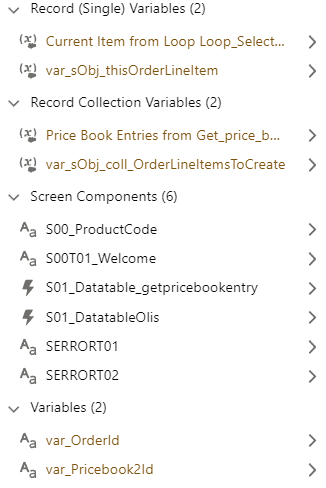
![A screenshot of the element manager.](https://wiki.sfxd.org/uploads/images/gallery/2022-02/scaled-1680-/image-1644418003456.png)

<div class="align-center" data-layout="center" data-node-type="mediaSingle" data-width="50" id="bkmrk-screenshot-from-the-">Screenshot from the Manager, with examples of Variables and Screen elements</div>#### Logics

1. Any Decision ***SHALL*** start by <span class="code" spellcheck="false">DEC</span> if the decision is an open choice, or <span class="code" spellcheck="false">CHECK</span> if it is a logical terminator, followed by an underscore. The Action Name ***SHOULD*** furthermore be prefixed by <span class="code" spellcheck="false">Is</span>, <span class="code" spellcheck="false">Can</span>, or another adverb indicating the nature of the decision, as well as a short description of what is checked.
    
    
    - Any Decision Outcome ***SHALL*** start with the Decision Name without any Prefixes, followed by an underscore, followed by the Outcome.
    - The Default Outcome ***SHOULD*** be used for error handling and relabeled <span class="code" spellcheck="false">ERROR</span> where applicable - you *can* relabel the default outcome!
2. Any Assignment ***SHALL*** always start with <span class="code" spellcheck="false">SET</span>, <span class="code" spellcheck="false">ASSIGN</span>, <span class="code" spellcheck="false">STORE</span>, <span class="code" spellcheck="false">REMOVE</span> or <span class="code" spellcheck="false">CALC</span> (depending on the type of the assignation being done) followed by an underscore.
    
    
    - <span class="code" spellcheck="false">SET</span> ***SHOULD*** be used for variable updates, mainly for Object variables, where the variable existed before.
    - <span class="code" spellcheck="false">ASSIGN</span> ***SHOULD*** be used for variable initialization, or updates on Non-Object variables.
    - <span class="code" spellcheck="false">STORE</span> ***SHOULD*** be used for adding elements to Collections.
    - <span class="code" spellcheck="false">REMOVE</span> ***SHOULD*** be used for removing elements from Collections.
    - <span class="code" spellcheck="false">CALC</span> ***SHOULD*** be used for any mathematical assignment or complex collection manipulation.
3. Any Loop ***SHALL*** always start with <span class="code" spellcheck="false">LOOP</span>, followed by an underscore, followed by the description of what is being iterated over. This can vary from the Collection name.

<table data-autosize="false" data-layout="full-width" data-number-column="false" data-table-local-id="9abed126-532c-41c2-a117-83c8562da948" id="bkmrk-type-name-descriptio-3"><tbody><tr><th class="pm-table-header-content-wrap" data-colwidth="226.67">Type

</th><th class="pm-table-header-content-wrap" data-colwidth="226.67">Name

</th><th class="pm-table-header-content-wrap" data-colwidth="226.67">Description

</th></tr><tr><td class="pm-table-cell-content-wrap" data-colwidth="226.67">Assignment to set the sObj\_This\_OpportunityProduct record values

</td><td class="pm-table-cell-content-wrap" data-colwidth="226.67">SET\_OppProdValues

</td><td class="pm-table-cell-content-wrap" data-colwidth="226.67">Sets the OppProd based on calculated discounts and quantities.

</td></tr><tr><td class="pm-table-cell-content-wrap" data-colwidth="226.67">Assignment to store the Opportunity Product for later creation in a collection variable

</td><td class="pm-table-cell-content-wrap" data-colwidth="226.67">Name: STORE\_ThisOppProd  
Assignment: {!sObj\_coll\_OppProdtoCreate} Add {!sObj\_This\_OpportunityProduct}

</td><td class="pm-table-cell-content-wrap" data-colwidth="226.67">Adds the calculated Opp Prod lines to the collvar to create.

</td></tr><tr><td class="pm-table-cell-content-wrap" data-colwidth="226.67">DML to create multiple records store in a collection sObj variable

</td><td class="pm-table-cell-content-wrap" data-colwidth="226.67">CREATE\_OppProds

</td><td class="pm-table-cell-content-wrap" data-colwidth="226.67">Creates the configured OppProd.

</td></tr><tr><td class="pm-table-cell-content-wrap" data-colwidth="226.67">Decision to check selected elements for processing

</td><td class="pm-table-cell-content-wrap" data-colwidth="226.67">Decision: CHECK\_PBESelected  
Outcome one:   
CHECK\_PBESelected\_Yes  
Outcome two:  
CHECK\_PBESelected\_No  
Default Outcome: Catastrophic Failure

</td><td class="pm-table-cell-content-wrap" data-colwidth="226.67">Check if at least one row was selected. Otherwise terminates to an error screen.

</td></tr><tr><td class="pm-table-cell-content-wrap" data-colwidth="226.67">Decision to sort elements based on criteria

</td><td class="pm-table-cell-content-wrap" data-colwidth="226.67">Decision: DEC\_SortOverrides  
Outcome one:   
SortOverrides\_Fields  
Outcome two:  
SortOverrides\_Values  
Outcome three:  
SortOverrides\_Full  
Default Outcome: Catastrophic Failure

</td><td class="pm-table-cell-content-wrap" data-colwidth="226.67">Based on user selection, check if we need to override information within the records, and which information needs to be overridden.

</td></tr><tr><td class="pm-table-cell-content-wrap" data-colwidth="226.67">Email Alert sent from Flow informing user of Invoice reception

</td><td class="pm-table-cell-content-wrap" data-colwidth="226.67">EA01\_EI10\_InvoiceReceived

</td><td class="pm-table-cell-content-wrap" data-colwidth="226.67">Sends template EI10 with details of the Invoice to pay

</td></tr></tbody></table>

<div id="bkmrk--2"><svg class="SnapLinksHighlighter" xmlns="http://www.w3.org/2000/svg"></svg></div>